The New Simplified DISH Voice Remote: Entertainment Made Easier
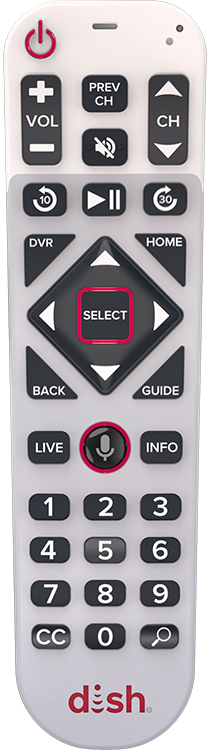
If you’ve ever felt overwhelmed by a remote control that looks like a flight deck, DISH has an answer for you. The DISH 60-Series Simplified Voice Remote is designed to strip away the clutter, focusing on accessibility and ease of use for every viewer.
Whether you’re looking for a more ergonomic grip or need a remote that supports vision or coordination limitations, here’s why this simplified model is a game-changer.
A Design Built for Everyone
The "Simplified" in the name isn't just marketing—it's a complete redesign of the user experience.
- Larger, Tactile Buttons: The remote features prominent backlit buttons that are easier to see and press, especially in low-light settings.
- Automatic Guide Scaling: In a clever move for accessibility, pairing this remote automatically increases the text size on your on-screen channel guide.
- Ergonomic Grip: It’s larger than standard models, offering a more comfortable hold, and even includes a loop for an optional wrist strap.
- Simplified Layout: By removing complex input buttons, DISH has reduced the chance of accidental setting changes that can lead to "no signal" frustration.
The Power of Your Voice
The centerpiece of the remote is the integrated voice control. By holding the microphone button, you can bypass manual searching entirely.
- Quick Navigation: Say "Tune to ESPN" or "Go to Netflix" to jump straight to your destination.
- Natural Language Search: You can search for content by actor, genre, or title—try saying "Free movies starring Brad Pitt" or "Show me comedies".
- Google Assistant Integration: On compatible receivers, you can even ask for the weather, sports scores, or manage your Google calendar.
Frustration-Free Features
Beyond the buttons, DISH included several "quality of life" upgrades:
- Remote Locator: Never lose it in the couch cushions again. Press the "Locate Remote" button on your receiver, and the remote will beep and flash until you find it.
- Dedicated CC Button: A one-touch button for Closed Captioning makes it simple to toggle subtitles on and off instantly.
- Universal Control: It can be programmed to control the power and volume of your TV and other devices, cutting down on coffee table clutter.
How to Get Started
Pairing is straightforward: press the SYS INFO button on your DISH receiver, then press the Microphone button on your remote. Three beeps will confirm you're ready to go.